
From the Office of Multifamily Housing Programs:
Dear Owners/Agents:
Please note that the below communication requires Owners/Agents to act on information in HUD’s Enterprise Income Verification (EIV) system within 30 calendar days of today’s date.
In a letter sent to Owners/Agents on January 12, 2026, the Department reminded you of your legal obligation to ensure that Section 8 Project-Based Rental Assistance (PBRA) is provided only to U.S. citizens and noncitizens who have eligible immigration status[1]. That letter also reaffirmed the procedures you must take to verify PBRA applicant citizenship/eligible immigration status and how to calculate prorated assistance for mixed-status families[2].
Today, HUD’s Office of Multifamily Housing Programs released a new EIV project-level report for Owners/Agents to assist in identifying potential tenant eligibility discrepancies using available federal citizenship and immigration information.
EIV-SAVE Tenant Matching Report
The EIV-SAVE Tenant Matching Report is a point in time report which cross-references HUD-50059 tenant data submitted to HUD’s Tenant Rental Assistance Certification System (TRACS) with information in U.S. Citizenship and Immigration Services (USCIS)’s Systematic Alien Verification for Entitlements (SAVE) system[3] to produce an initial verification response[4].
This report is designed to include tenants who have a potential discrepancy between their citizenship/eligible immigration status listed in TRACS and the information in SAVE. The Owner/Agent must review these discrepancies and ensure tenant eligibility in accordance with Attachment A.
At the time of this communication, the EIV-SAVE Tenant Matching Report is a one-time report. In its current state, a tenant will not actually be removed from the report until HUD publishes an updated report. In the future, HUD may provide an updated report on a routine basis.
To access this report in EIV and review a sample of the EIV-SAVE Tenant Matching Report (including an explanation of the report’s data fields), please refer to the instructions outlined in Attachment A.
Owners/Agents can only access EIV-SAVE Tenant Matching Reports for their assigned projects and must have access to EIV to review the report. Please email MFH_EIV@hud.gov for assistance with EIV access and EIV project assignments.
References:
[1] Section 214 of the Housing and Community Development Act of 1980 and Executive Order 14218, Ending Taxpayer Subsidization of Open Borders.
[2] Mixed family, as defined in 24 CFR § 5.504, means a family whose members include those with citizenship or eligible immigration status, and those without citizenship or eligible immigration status.
[3] SAVE is an online information service that provides point in time immigration status and U.S. citizenship information to federal, state, local, territorial, and tribal agencies.
[4] Initial verification is the first step in determining an individual’s eligibility for federal benefits. Initial verification electronically compares the information from HUD against immigration records available to the Department of Homeland Security and returns a response within seconds.
Required Owner/Agent Actions within the Next 30 Days
Within the next 30 calendar days, Owners/Agents must access the EIV-SAVE Tenant Matching Report in EIV for each project with an identified discrepancy and resolve all discrepancies by performing the step-by-step actions described in Attachment B. Please thoroughly review attachments A and B prior to taking any action. Please note, not all projects have tenant discrepancies, so some Owners/Agents will find that they have no reports to review or that they have fewer reports to review than the number of projects that they own/manage. If a project does not have a report, then there are no discrepancies for the Owner/Agent to resolve.
This action will verify 1) that tenant data submissions to TRACS are error free and 2) that Owners/Agents obtained the required citizenship/eligible immigration documentation for all tenants in accordance with HUD’s regulations in 24 CFR Part 5, Subpart E. The Department believes that many of the discrepancies noted on the report can be resolved by correcting data entry errors in HUD-50059 submissions, but others will require more in-depth investigation.
Importantly, a tenant’s inclusion in the report does not definitively mean that they are ineligible for assistance. Owners/Agents may not deny or end an individual’s assistance based on discrepancies noted in the report that require further action or resubmission to SAVE. If an Owner/Agent determines that a tenant is ineligible for assistance after following all required steps in Attachment B, they must allow for an appeal and informal hearing per 24 CFR § 5.514 before terminating or prorating the tenant’s assistance.
If a tenant believes that their record at a federal agency contains errors or needs to be updated, the individual must contact the agency that maintains the record, such as the Social Security Administration or U.S. Citizenship and Immigration Services. It is important to note that SAVE is a database tool and it cannot correct source records.
Please note that tenants classified as ineligible noncitizens in TRACS are not currently assisted under PBRA and are excluded from the EIV-SAVE Tenant Matching Report.
HUD recommends that owners/agents use all available resources to learn more about SAVE and its capabilities, including the following webpages:
- https://www.uscis.gov/save
- SAVE Records Fast Facts for Benefit Applicant (provides more information on records updates and corrections).
- SAVE Tutorial: Introduction to SAVE and the Verification Process for SAVE Users
- SAVE Guidance
Owner/Agent Compliance
Owners/Agents should complete the steps in Attachment B for each tenant with an identified discrepancy. Aside from submitting corrected HUD-50059s and adjustments to Housing Assistance Payment (HAP) vouchers when appropriate, Owners/Agents do not need to submit additional follow up information. HUD will monitor EIV-SAVE Tenant Matching Report usage and may request information from an Owner/Agent as necessary.
Failure to perform the steps outlined in this letter may result in EIV penalties per Handbook 4350.1, REV-1, Ch. 9-19 and/or Active Partners Participation System (APPS) compliance flags for the Owner/Agent.
We sincerely appreciate your ongoing collaboration and commitment to ensuring that HUD assistance is provided only to eligible individuals and families. Please direct your EIV and SAVE questions to the following email boxes:
- EIV-SAVE Tenant Matching Report: MFH_SAVE@hud.gov
- EIV access and project assignments: MFH_EIV@hud.gov
- SAVE registration: MFH_SAVE@hud.gov
- SAVE password reset: https://secure.login.gov/
Please do not email USCIS with requests for account registration or password updates. USCIS does not manage HUD SAVE accounts.
References:
See Housing Notice 2016-15: Processing Guide for Previous Participation Reviews of Prospective Multifamily Housing and Healthcare Programs’ Participants
Attachment A: How to Navigate the EIV-SAVE Tenant Matching Report
Select USCIS-SAVE System under External Links on the EIV home page:
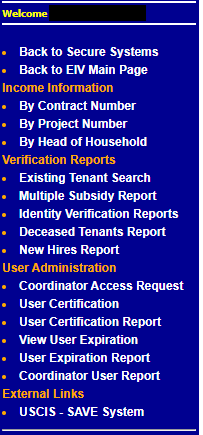
Note: This link previously redirected users to SAVE; this link now directs users to the EIV-SAVE Tenant Matching Report.
Click on the drop-down menus to select either a Contract Number or a Project Number. Please note, your drop-down list will only contain properties you manage in EIV that have one or more tenants identified with discrepancies. If a project does not show up on the list, it does not have any identified discrepancies.
Next, click Get Report.
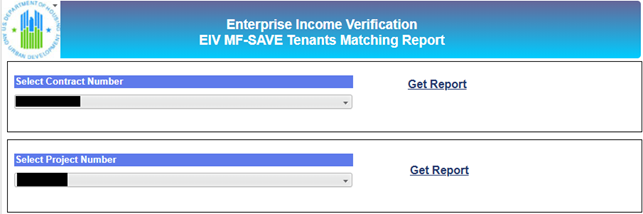
Below is a sample MF EIV-SAVE Tenant Matching Report for an individual project. Please note, the report will only contain tenants with identified discrepancies. Many impacted contracts will have a small number of tenants (five or less). The date in the top right corner of the page is the date that the TRACS data was cross-referenced with SAVE information.
Select Back to EIV MF-SAVE Navigation to get back to the main page. From here, owners/agents can select a different Contract Number or Project Number to review.

Explanation of Data Fields:
Contract Number: A project’s unique 11-character number assigned by HUD for the purpose of identifying the project’s rental assistance contract.
Project Number: A project’s unique 8-character number assigned by HUD for the purpose of identifying the project’s loan.
Property ID: The property’s unique 9-digit ID assigned by HUD in its portfolio database, the integrated Real Estate Management System (iREMS).
Head of Household SSN: The last 4 digits of the head of household’s Social Security Number.
Effective Date: Theeffective date of the income recertification (HUD-50059) from which tenant data was cross-referenced with SAVE information.
Subsidy Type Code: The subsidy type code entered into the family’s HUD-50059. For example, H1= Section 8; H4 = 236.
Member SSN: The last 4 digits of the family member’s Social Security Number whose TRACS data is potentially discrepant with their information in SAVE.
First Name: The family member with the potential discrepancy’s first name.
Last Name: The family member with the potential discrepancy’s last name.
Unit Address: The family’s unit address in the project. This information will populate from the form HUD-50059 if it was entered by the owner/agent.
USCIS Response: The initial verification response returned for the family member by SAVE.
Attachment B: Step-by-Step Instructions to Resolve Discrepancies in the EIV-SAVE Tenant Matching Report
Note: Owners/Agents must ensure they have both EIV and SAVE access before completing the following steps. Certain SAVE resources can only be accessed when a user is logged in.
Step 1: Log in to SAVE and navigate to Help>Resources to find the Guide to Understanding SAVE Verification Responses. Locate the “Initial Verification Responses” section of the Guide to assist with interpreting the USCIS Responses listed in the EIV report.
Step 2: Log in to EIV and navigate to the USCIS-SAVE System report under “External Links”. Select a contract or project number to review. Note: Only properties with tenant discrepancies will have reports available to review.
Step 3: Find the USCIS Response (last column of the report) for each tenant listed in the project’s report. If the tenant is no longer receiving assistance or no longer lives at the property, then no further action is necessary.
Step 4: Confirm that the tenant’s file contains acceptable evidence of eligible immigration status required by 24 CFR § 5.508 and prior SAVE verification results (including Class of Admission (COA)[1]) if applicable. See the table below for a description of acceptable evidence based on an individual’s citizenship or immigration status.
If acceptable evidence does not exist in the tenant file, then the owner/agent must obtain the required evidence and verify the tenant’s eligible immigration status per 24 CFR § 5.512.
References:
[1] COA refers to a specified single category of admission to a lawful immigration status
| Citizenship/Immigration Status | Required Evidence of Citizenship or Eligible Immigration Status |
| U.S. citizens or U.S. nationals | Signed declaration of U.S. citizenship or U.S. nationalityOwners may require applicants/residents to provide verification of citizenship |
| Noncitizens who are 62 or older at the time of admission | Signed declaration of eligible immigration statusProof of age document |
| All other noncitizens | Signed declaration of eligible immigration statusAn original document designated by DHS as acceptable evidence of immigration status in one of the six categories in § 5.506(a) for the specific immigration status claimed by the individualVerification consent form |
| Individuals who do not contend immigration statusNote: These individuals will not be listed in the EIV-SAVE Tenant Matching Report | The family must identify in writing to the owner/agent the family member (or members) who do not contend that they have eligible immigration status. |
Step 5: Verify that the tenant’s biographic information in Section C. Household Information of the HUD-50059 (e.g., name, date of birth, relationship code, citizenship status, Social Security Number, alien registration number, etc.) is correct based on tenant file documents. Owners/agents must immediately correct any data entry errors by transmitting a corrected HUD-50059 to TRACS.
Note: Do not use dashes when entering an individual’s alien registration number into the HUD-50059. For example, if an alien registration number is A-123-456-789, enter the alphanumeric number as A123456789.
Step 6: If steps 4 and 5 do not resolve the discrepancy between the information for a tenant listed in the EIV-SAVE Tenant Matching Report and the acceptable evidence of eligible immigration status provided by the tenant, then the Owner/Agent may create a new SAVE case using a full nine-digit Social Security Number (SSN) and/or immigration enumerator (such as an A-Number/USCIS Number, Arrival-Departure Record I-94 Number, SEVIS ID Number, Naturalization/Citizenship Certificate Number, or Visa Number) to determine the tenant’s citizenship/eligible immigration status. If the Owner/Agent determines that the tenant does not have citizenship or eligible immigration status based on the previous steps, the owner/agent must follow HUD’s regulations at 24 CFR § 5.514 prior to reducing or terminating a family’s assistance, after obtaining a signed verification consent form from the tenant, or an adult residing in the unit if the tenant is a child.
Step 7: Retain the EIV-SAVE Tenant Matching Report in both the project’s EIV Master File and in the tenant file, along with notes on actions taken to resolve the discrepancy.